Friday, November 4, 2022

Search nearby places - Comparing three API (Google Places API, Geoapify API and HERE API)

 In the post, I will compare API from three different providers to search nearby places the three API to compare are: Google Places API, Geoapify API and HERE API.

For each of the platforms, you need to register and get a developer API key to use. All the platform offer a limited free API quota to start with.


Google Places API


import requests
import pandas as pd
from datetime import datetime

df = pd.read_csv('datafile.csv')


YOUR_API_KEY = 'AIza......'

i = 1
for row, col in df.iterrows():
    lat = col['Latitude']
    long = col['Longitude']
    print(i, 'Processing...', lat, long)
    
    url = f'https://maps.googleapis.com/maps/api/place/nearbysearch/json?location={lat}%2C{long}&radius=4850&type=laundry&keyword=laundromats&key={YOUR_API_KEY}'

    payload={}
    headers = {}

    response = requests.request("GET", url, headers=headers, data=payload)

    # Get current time...
    now = datetime.now()
    current_time = now.strftime("%Y%m%d__%H%M%S")

    # Write to file....
    with open(fr'JSON folder\\GoogleAPI\\{state_folder}\\{current_time}.json', 'w') as outfile:
        json.dump(response.json(), outfile)

    i = i+1
    
    
print('Done...')


Geoapify API


GeoApify_API_KEY = '378122b08....'

url = 'https://api.geoapify.com/v2/places'

params = dict(
    categories: 'commercial',
    filter: 'rect:7.735282,48.586797,7.756289,48.574457',
    limit: 2000,
    apiKey=f'{GeoApify_API_KEY}'
)

resp = requests.get(url=url, params=params)
data = resp.json()

print(data)


HERE API


HERE_API_KEY = 'WEYn....'
coord = '27.95034271398129,-82.45670935632066' # lat, long
url = f'https://places.ls.hereapi.com/places/v1/discover/here?apiKey={HERE_API_KEY}&at={coord}&laundry'

response = requests.get(url).json()
# print(response.text)

# Get current time...
now = datetime.now()
current_time = now.strftime("%Y%m%d__%H%M%S")


# Write to file....
with open(fr'JSON folder\\{current_time}.json', 'w') as outfile:
    json.dump(response, outfile)
    
print('Done...')


Tuesday, November 1, 2022

Thursday, October 27, 2022

Convert Coordinates in United Nations Code for Trade and Transport Locations (UN/LOCODE) Code List to GIS friendly format

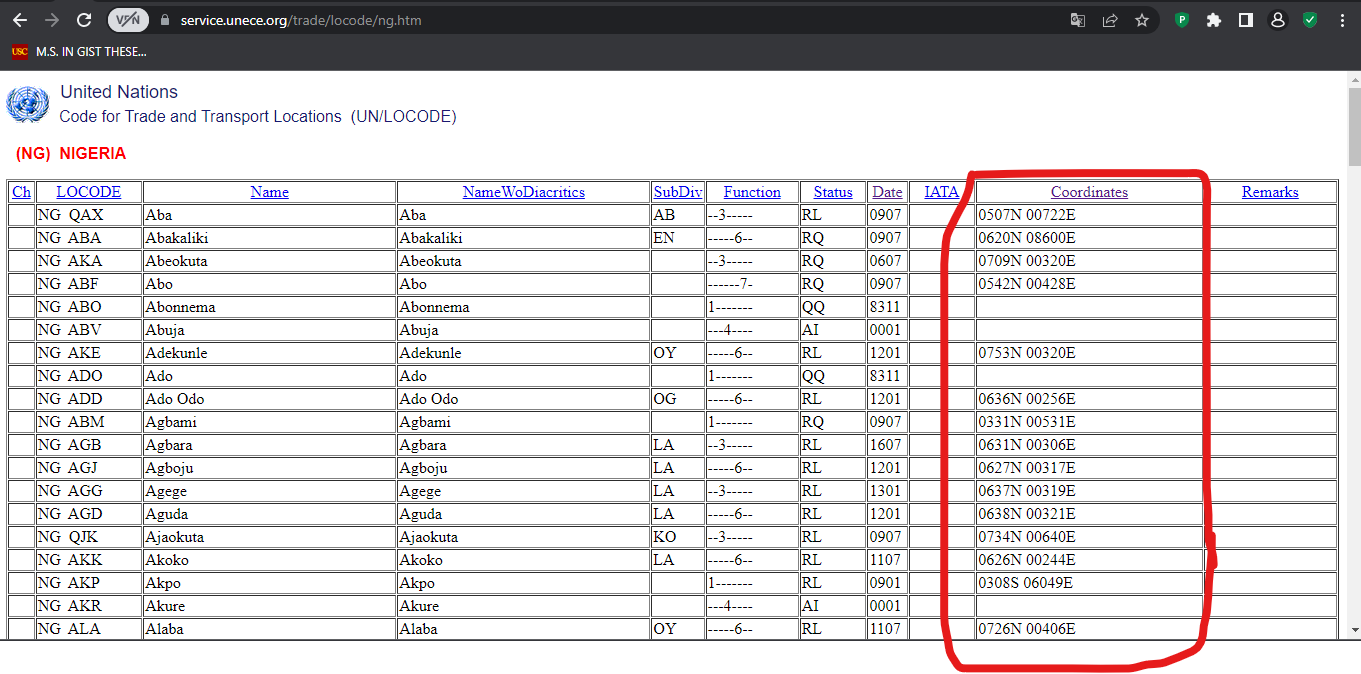
 The table code list at 'UN/LOCODE Code List by Country and Territory' has a column named coordinate. This column contains the geographical coordinates (latitude/longitude) in a format that is not suitable for use in GIS software. The reason is explained on this page by UN.

So, basically it say in order to avoid unnecessary use of non-standard characters and space, the following standard presentation is used: 0000lat 00000long

(lat - Latitude: N or S ; long – Longitude: W or E, only one digit, capital letter)

Where the last two rightmost digits refer to minutes and the first two or three digits refer to the degrees for latitude and longitude respectively. In addition, you must specify N or S for latitude and W or E for longitude, as appropriate.


While this may be a good format for them, it is not a good format for most GIS platforms. Hence there is need to convert it into what the GIS can easily utilize.

This means we will convert coordinate that looks like this '0507N 00722E' to decimal degrees or degree minute and seconds.


unlocode_coord = '0507S 00722E'

unlat, unlong = unlocode_coord.split(' ')


# Handling Latitide...
# --------------------------
# Remove the last characted which will always be either: N or S...
unlat = unlat.replace('N', '').replace('S', '') # .rstrip('N').rstrip('S')
lat_deg = unlat[:2]
lat_min = unlat[-2:]

# Result in DMS... Degrees Minutes
print(f"The result in Degree Munite is: {lat_deg}°{lat_min}'")


# Result in DD.... Decimal Degrees - Since 1° = 60' and 1' = 60"
lat_min_dd = round(float(lat_min)/60, 2)
# Get the fractional and integer parts, we can use: modulo (%) operator or math.modf
lat_sec_dd = int(lat_min_dd) + round(lat_min_dd % 1, 2)/60
# Add the D+M+S...
lat_dd = round(float(lat_deg) + lat_min_dd + lat_sec_dd, 3)
print(f"The result in Decimal Degree is: {lat_dd}°")


# Handling Longitude...
# --------------------------
# Remove the last characted which will always be either: N or S...
unlong = unlong.rstrip('E').rstrip('W')
long_deg = unlong[:3]
long_min = unlong[-2:]

print()
# Result in DMS... Degrees Minutes Seconds
print(f"The result in Degree Munite is: {long_deg}°{long_min}'")

# Result in DD.... Decimal Degrees - Since 1° = 60' and 1' = 60"
long_min_dd = round(float(long_min)/60, 2)
# Get the fractional and integer parts, we can use: modulo (%) operator or math.modf
long_sec_dd = int(long_min_dd) + round(long_min_dd % 1, 2)/60
# Add the D+M+S...
long_dd = round(float(long_deg) + long_min_dd + long_sec_dd, 3)
print(f"The result in Decimal Degree is: {long_dd}°")

You may use the tool on this website to learn more as seen below.


The reverse - from decimal degrees to UN/LOCODE coordinates

# ------------------- For Latitude ---------------------------------

lat = 13.893937

if lat >= 0: # Northern Hermisphere
    # Degree...
    lat_degree = int(lat)
    # Minute
    lat_minute = int((lat - lat_degree) * 60)
    
    lat_result = str(lat_degree) + str(lat_minute) + 'N'
    print(f'Latitude in UN/LOCODE is: {lat_result}')
    
else: # Southern Hermisphere
    lat = abs(lat)

    # Degree...
    lat_degree = int(lat)
    # Minute
    lat_minute = int((lat - lat_degree) * 60)
    
    lat_result = str(lat_degree) + str(lat_minute) + 'S'
    print(f'Latitude in UN/LOCODE is: {lat_result}')


# ------------------- For Longitude ---------------------------------

long = -123.893937

if long >= 0: # Northern Hermisphere
    # Degree...
    long_degree = int(long)
    long_degree1 = str(int(long))

    
    if len(long_degree1) == 1:
        long_degree1 = '00' + long_degree1
    elif len(long_degree1) == 2:
        long_degree1 = '0' + long_degree1
    elif len(long_degree1) == 3:
        long_degree1 = long_degree1    
        
    # Minute
    long_minute = int((long - long_degree) * 60)
    
    long_result = str(long_degree1) + str(long_minute) + 'E'
    print(f'Longitude in UN/LOCODE is: {long_result}')
    
else: # Southern Hermisphere
    long = abs(long)

    # Degree...
    long_degree = int(long)
    # Minute
    long_minute = int((long - long_degree) * 60)
    
    long_result = str(long_degree) + str(long_minute) + 'W'
    print(f'Longitude in UN/LOCODE is: {long_result}')


That is it!

Saturday, October 22, 2022

Mathematics of successful life in Python

There is this text that trends over the social media the twenty six alphabets are assigned number from one to twenty six and it was used to calculate the percentage of some word as quoted below;-

I found this to be very interesting and meaningful message to share:-
IF:
A = 1 
B = 2 
C = 3  
D = 4
E = 5  
F = 6
G = 7  
H = 8
I = 9  
J = 10  
K = 11  
L = 12
M = 13  
N = 14 
O = 15  
P = 16
Q = 17
R = 18 
S = 19
T = 20
U = 21
V = 22 
W = 23  
X = 24
Y = 25 
Z = 26

THEN,
H+A+R+D+W+O+R+K
8+1+18+4+23+15+18+11 = 98%

K+N+O+W+L+E+D+G+E
11+14+15+23+12+5+4+7+5 = 96%

L+O+V+E
12+15+22+5 = 54%

L+U+C+K
12+21+3+11 = 47%

None of them makes 100%.
Then what makes 100%?
Is it Money? NO!

M+O+N+E+Y
13+15+14+5+25 = 72%

E+D+U+C+A+T+I+O+N
5+4+21+3+1+20+9+15+14 = 92%

Leadership? NO!

L+E+A+D+E+R+S+H+I+P
12+5+1+4+5+18+19+8+9+16 = 97%

Every problem has a solution, only if we perhaps change our ATTITUDE...
A+T+T+I+T+U+D+E = 1+20+20+9+20+21+4+5  = 100%
It is therefore OUR ATTITUDE towards Life and Work that makes OUR Life 100% Successful.

Amazing mathematics
Let's change our Attitude of doing things in life.
Because it's our attitude that is our problem
Not the Devil.
Tusaai Piadin Gideon copied


Let see how we can transform this into a python script.

alphabets = {'A' : 1, 'B' : 2, 'C' : 3, 'D' : 4, 'E' : 5, 'F' : 6, 'G' : 7, 'H' : 8, 'I' : 9, 'J' : 10, 'K' : 11, 'L' : 12, 'M' : 13, 'N' : 14, 'O' : 15, 'P' : 16, 'Q' : 17, 'R' : 18, 'S' : 19, 'T' : 20, 'U' : 21, 'V' : 22, 'W' : 23, 'X' : 24, 'Y' : 25, 'Z' : 26}

solve = 'M+O+N+E+Y'
solve1 = solve.split('+')
solve2 = [ alphabets[a] for a in solve1 ]
solve3 = str(sum(solve2)) + '%'

print(solve3)

That is it!

Wednesday, October 19, 2022

Working with Dropbox API in python

 In this post, I will explore Dropbox API. If you don't know what Dropbox is, according to its Wikipedia page: "Dropbox is a file hosting service operated by the American company Dropbox, Inc., headquartered in San Francisco, California, U.S. that offers cloud storage, file synchronization, personal cloud, and client software".

Now that you know what dropbox is, lets see how we can do some basic operations such as uploading, renaming, create, copy, move, delete, download, list to files and folders using python API.

First create an app to generate an API TOKEN on the app developer console page after setting up the right permissions for you use case.


There are two common ways/methods of connecting to dropbox via python:-

The first is using a third party module named "dropbox" which you can install using pip install dropbox. The documentation is found on Dropbox for Python web page.


The second way is using requests module based on their official Dropbox API Explorer.


Which ever method you decide to adopt, it is just a matter of preference. In my case I usually use the combination of the two depending on what is easier for what I want to implement.

Both have excellent documentations. In fact, the Dropbox API Explorer is fantastic for visually constructing the end calls you wanted. For example, I want to get list of contents in a folder, I will on lis_folder tab on the left and configure the options as seen. Then click on show code to grab the code for use in python environment.


Just copy the resulting code into your python environment to execute the API.

import requests
import json

url = "https://api.dropboxapi.com/2/files/list_folder"

headers = {
    "Authorization": "Bearer <access-token>",
    "Content-Type": "application/json"
}

data = {
    "path": "/Images"
}

r = requests.post(url, headers=headers, data=json.dumps(data))

Friday, October 7, 2022

The cat API

 The cat API is a public service API all about Cats. This means it is a service where people who like cats share picture and other details about cats and developers uses it in there applications.


The python code below uses the free cat api to search for random cats, fetch there details and organize it into a dataframe table and the download the pictures onto the local disc.

import json
import shutil
import requests

url = 'https://api.thecatapi.com/v1/images/search'

data_list = []
for i in range(101):
    print('Getting random cat image...', i)
    
    # Send requests...
    response = requests.get(url)
    
    # Get values from response...
    data = list(response.json()[0].values())
    
    # Append data to list...
    data_list.append(data)


# Get columns names from response...
cols = list(response.json()[0].keys())

# Create df...
data_list_df = pd.DataFrame(data_list, columns=cols)
# ===========================================


# Download images....

i = 1
for url in data_list_df['url']:
    # Get image extension...
    img_ext = url.split('.')[-1]
    imgfile_name = f'cat_{i}.{img_ext}'
    print('Processsing...', imgfile_name)
    
    # Send requests...
    res = requests.get(url, stream=True)

    # Write image to disc...
    with open(f'cat_image/{imgfile_name}','wb') as f:
        shutil.copyfileobj(res.raw, f)
        
    # Alternative: write image to disc...
    # with open(f'cat_image/{imgfile_name}','wb') as f:
    #     f.write(res.content)
    
    i = i+1
    # break


Similarly, the code above can be adapted for the Dog API or Dog CEO API.


Thank you for following.

Monday, September 26, 2022

Spatial Distribution of Federal Polytechnics in Nigeria

 On this post, I will map the National Board for Technical Education (NBTE) approved Federal Polytechnics in Nigeria to have a sense of on how they are spatially distributed in the country.

There are 40 polytechnics listed on the NBTE web page above, copy the list into a spreadsheet and geocode the addresses. With this geocoded result, we can prepare the spatial distribution of the federal polytechnic schools as seen below:-


QGIS software was then use to prepare the map.


From the spatial distribution, it could be seen that boundaries between Kebbi and Niger states is a potential location a new proposed federal polytechnic. Similarly, we can recommend/proposed new federal polytechnic between Edo - Ondo states and Adamawa - Taraba states as seen in red color below.


Thank you for reading.

Friday, September 16, 2022

Batch Geocoding and Reverse Geocoding using HERE API

A python script for batch geocoding and reverse geocoding using HERE API

HERE API service allows you to submit batch geocoding and reverse geocoding requests.  Your submission must conform with the Input Data guidelines. The Batch Geocoder API handles the geocoding and reverse geocoding asynchronously.

As stated on the API doc page linked above, to retrieve the output of a successful batch request, you must follow the steps below:-

  1. Upload your data with a POST request to the resource jobs.
  2. Using the RequestId value contained in the response to your data upload request, check the status of the job with a GET request. You can only download the results when the job status is completed
  3. Using the RequestId value contained in the response to your data upload request, download the results by sending a GET request.


Batch Geocoding Python Script

Input Data:


Python Script:

import requests
import json
import time
import zipfile
import io
from bs4 import BeautifulSoup
import glob

import pandas as pd


mykey = 'xxxxxxxxxxxxxx' ## Register a HERE MAPS DEVELOPER API

class Batch:
    SERVICE_URL = "https://batch.geocoder.ls.hereapi.com/6.2/jobs"
    jobId = None
    
    
    def __init__(self, apikey=""): ## use a HERE MAPS DEVELOPER API
        self.apikey = apikey
        
            
    def start(self, filename='testfile.csv', indelim=",", outdelim=","):
        
        file = open(filename, 'rb')

        params = {
            "action": "run",
            "apiKey": self.apikey,
            "politicalview":"RUS",
            "gen": 9,
            "maxresults": "1",
            "header": "true",
            "indelim": indelim,
            "outdelim": outdelim,
            "outcols": "displayLatitude,displayLongitude,locationLabel,houseNumber,street,district,city,postalCode,county,state,country",
            "outputcombined": "true",
        }

        response = requests.post(self.SERVICE_URL, params=params, data=file)
        self.__stats (response)
        file.close()
    

    def status (self, jobId = None):

        if jobId is not None:
            self.jobId = jobId
        
        statusUrl = self.SERVICE_URL + "/" + self.jobId
        
        params = {
            "action": "status",
            "apiKey": self.apikey,
        }
        
        response = requests.get(statusUrl, params=params)
        self.__stats (response)
        

    def result (self, jobId = None):

        if jobId is not None:
            self.jobId = jobId
        
        print("Requesting result data ...")
        
        resultUrl = self.SERVICE_URL + "/" + self.jobId + "/result"
        
        params = {
            "apiKey": self.apikey
        }
        
        response = requests.get(resultUrl, params=params, stream=True)
        
        if (response.ok):    
            zipResult = zipfile.ZipFile(io.BytesIO(response.content))
            zipResult.extractall()
            print("File saved successfully")
        
        else:
            print("Error")
            print(response.text)


    def __stats (self, response):
        if (response.ok):
            parsedXMLResponse = BeautifulSoup(response.text, "lxml")

            self.jobId = parsedXMLResponse.find('requestid').get_text()
            
            for stat in parsedXMLResponse.find('response').findChildren():
                if(len(stat.findChildren()) == 0):
                    print("{name}: {data}".format(name=stat.name, data=stat.get_text()))
            
            # Contruct the zipfile url...
            self.zip_result = f'https://batch.geocoder.ls.hereapi.com/6.2/jobs/{self.jobId}/result?apiKey={mykey}'
            print("Zipfile URL: ", self.zip_result)
            print('-'*30)
            
            # Set delay for the zipfile to be ready for download on HERE server...
            time.sleep(50)
            
            # Download and extract zip file...
            self.r = requests.get(self.zip_result, stream=True)
            self.z = zipfile.ZipFile(io.BytesIO(self.r.content))
            self.z.extractall(r"HERE\\Output files")

        else:
            print(response.text)

if __name__=="__main__":
    
    service = Batch(apikey=mykey) ## use a HERE MAPS DEVELOPER API
    
    spreadsheet_folder = glob.glob(r'HERE\\Input files\\csv_file\\df_newPU\\*.csv')
    for cvs_file in spreadsheet_folder:
        print('Geocoding file...', cvs_file)
        service.start (cvs_file, indelim = ",", outdelim = ",")


Batch Reverse Geocoding Python Script

Input Data:


Python Script:

l# Reverse Geocode....
class Batch:
    SERVICE_URL = "https://batch.geocoder.ls.hereapi.com/6.2/jobs"
    jobId = None
    
    
    def __init__(self, apikey=""): ## use a HERE MAPS DEVELOPER API
        self.apikey = apikey
        
            
    def start(self, filename='togeocode619.csv', indelim=",", outdelim=","):
        
        file = open(filename, 'rb')

        params = {
            "action": "run",
            "apiKey": self.apikey,
            "politicalview":"RUS",
            "gen": 9,
            "maxresults": "1",
            "header": "true",
            "indelim": indelim,
            "outdelim": outdelim,
            "outCols": "recId,latitude,longitude,locationLabel",
            "outputcombined": "true",
            "mode":"retrieveAddresses",
        }

        
        response = requests.post(self.SERVICE_URL, params=params, data=file)
        self.__stats (response)
        file.close()
    

    def status (self, jobId = None):

        if jobId is not None:
            self.jobId = jobId
        
        statusUrl = self.SERVICE_URL + "/" + self.jobId
        
        params = {
            "action": "status",
            "apiKey": self.apikey,
        }
        
        response = requests.get(statusUrl, params=params)
        self.__stats (response)
        

    def result (self, jobId = None):

        if jobId is not None:
            self.jobId = jobId
        
        print("Requesting result data ...")
        
        resultUrl = self.SERVICE_URL + "/" + self.jobId + "/result"
        
        params = {
            "apiKey": self.apikey
        }
        
        response = requests.get(resultUrl, params=params, stream=True)
        
        if (response.ok):    
            zipResult = zipfile.ZipFile(io.BytesIO(response.content))
            zipResult.extractall()
            print("File saved successfully")
        
        else:
            print("Error")
            print(response.text)


    def __stats (self, response):
        if (response.ok):
            parsedXMLResponse = BeautifulSoup(response.text, "lxml")

            self.jobId = parsedXMLResponse.find('requestid').get_text()
            
            for stat in parsedXMLResponse.find('response').findChildren():
                if(len(stat.findChildren()) == 0):
                    print("{name}: {data}".format(name=stat.name, data=stat.get_text()))
            
            # Contruct the zipfile url...
            self.zip_result = f'https://batch.geocoder.ls.hereapi.com/6.2/jobs/{self.jobId}/result?apiKey={mykey}'
            print("Zipfile URL: ", self.zip_result)
            print('-'*30)
            
            # Set delay for the zipfile to be ready for download on HERE server...
            time.sleep(50)
            
            # Download and extract zip file...
            self.r = requests.get(self.zip_result, stream=True)
            self.z = zipfile.ZipFile(io.BytesIO(self.r.content))
            self.z.extractall(r"HERE\\Output files")

        else:
            print(response.text)

if __name__=="__main__":
    
    service = Batch(apikey=mykey) ## use a HERE MAPS DEVELOPER API
    cvs_file = r"C:\Users\Yusuf_08039508010\Documents\Jupyter_Notebook\2022\Geocode Addresses\19k LatLong in Fr\reverse_geocode_input.csv"
    
    print('Geocoding file...', cvs_file)
    service.start (cvs_file, indelim = ",", outdelim = ",")
    
#     spreadsheet_folder = glob.glob(r'HERE\\Input files\\csv_file\\df_newPU\\*.csv')
#     for cvs_file in spreadsheet_folder:
#         print('Geocoding file...', cvs_file)
#         service.start (cvs_file, indelim = ",", outdelim = ",")


Happy geocoding!

Monday, August 22, 2022

Read point click coordinates on image in pixel and inches

 Listed below is a python code that uses opencv library to read an image and read the coordinate at mouse click. Left mouse click will display the coordinates in both pixels and inches while right mouse click will clear the coordinates by reloading the image.


# importing the module
import cv2


# Get list of all events in cv2... the one we want to use is the 'EVENT_LBUTTONDOWN' (left click)
all_events = [i for i in dir(cv2) if 'EVENT' in i]
# print(all_events)
# print(dir(cv2.EVENT_LBUTTONDBLCLK))


# reading the image
img_file = r"IMG_20180426_235051_042.jpg"
img = cv2.imread(img_file, 1)

# displaying the image
cv2.imshow('Title image window...', img)


# --------------------------------------------------------
# define the callback function...
def click_event(event, x, y, flags, params):
	global img
	
	if event == cv2.EVENT_LBUTTONDOWN:
		print(x, '---', y)

		# convert pixels to inches
		# Assuming PixelsPerInch resolution (PPI) is 96, therefore: PPI = 96 px / inch
		# 1 pixel = 1 inch / 96 >>>> 1 pixel = 0.010417 inch
		x_inch = round(x * 0.010417, 2)
		y_inch = round(y * 0.010417, 2)

		font = cv2.FONT_HERSHEY_SIMPLEX
		cv2.putText(img, f'{str(x)}, {str(y)}px ({x_inch}, {y_inch}inches)', (x, y), font, 1, (255, 0, 0), 2)
		cv2.imshow('Title image window...', img)


	# Clear screen text by right click...
	if event == cv2.EVENT_RBUTTONDOWN:
		print('Right Click...')

		img = cv2.imread(img_file, 1)
		cv2.imshow('Title image window...', img)
		cv2.setMouseCallback('Title image window...', click_event)


# use the callback function by setting the Mouse callback....
cv2.setMouseCallback('Title image window...', click_event)
# --------------------------------------------------------


# wait for a key to be pressed to exit
cv2.waitKey(0)

# close the window
cv2.destroyAllWindows()


That is it!

Friday, August 19, 2022

Copy a file to multiple directories

 Lets say we got nested folders as seen below where we want copy a file (text file in this case) into all the folders.


The python script below does what was stated above.


import os
import glob
import shutil
txt_file = r"C:\Users\Yusuf_08039508010\Documents\...\PDF Others\textfile.txt"
fldr = r'C:\Users\Yusuf_08039508010\Documents\Jupyter_Notebook\2022\...\PDF Others'

# Change dir to parent directory and get all subfolder...
os.chdir(fldr)
list_of_folder = glob.glob('**/', recursive=True)

# Copy text file from source (src) to destination (dst)
for f in list_of_folder:
    print('Processing...', f)
    shutil.copy( txt_file, f ) # shutil.copy( src, dst )


Enjoy!